How to Choose Among MT4 Backtest's Three Modeling Modes? "Every Tick" Is Not the Same as Real Tick-by-Tick
Compare the three MT4 backtest modes—Open Prices Only, Control Points, and Every Tick—choose based on EA decision frequency, and check historical data, spreads, and report limitations.
Author: Thomas | EA and Platform Practice | October 31, 2026
When backtesting an EA in MT4, many people see "Every Tick" and assume the test used every real historical quote, then treat a beautiful equity curve as a basis for live trading. This understanding overstates the credibility of the backtest. The MT4 Strategy Tester offers three modeling methods; the difference lies in how the price path within a candlestick is reconstructed. Even choosing the finest option still requires examining historical data, spreads, and the EA's trading logic. This article only discusses setup and interpretation methods; the charts are teaching illustrations and do not show real accounts or returns.
First, the chart: three options answer different questions
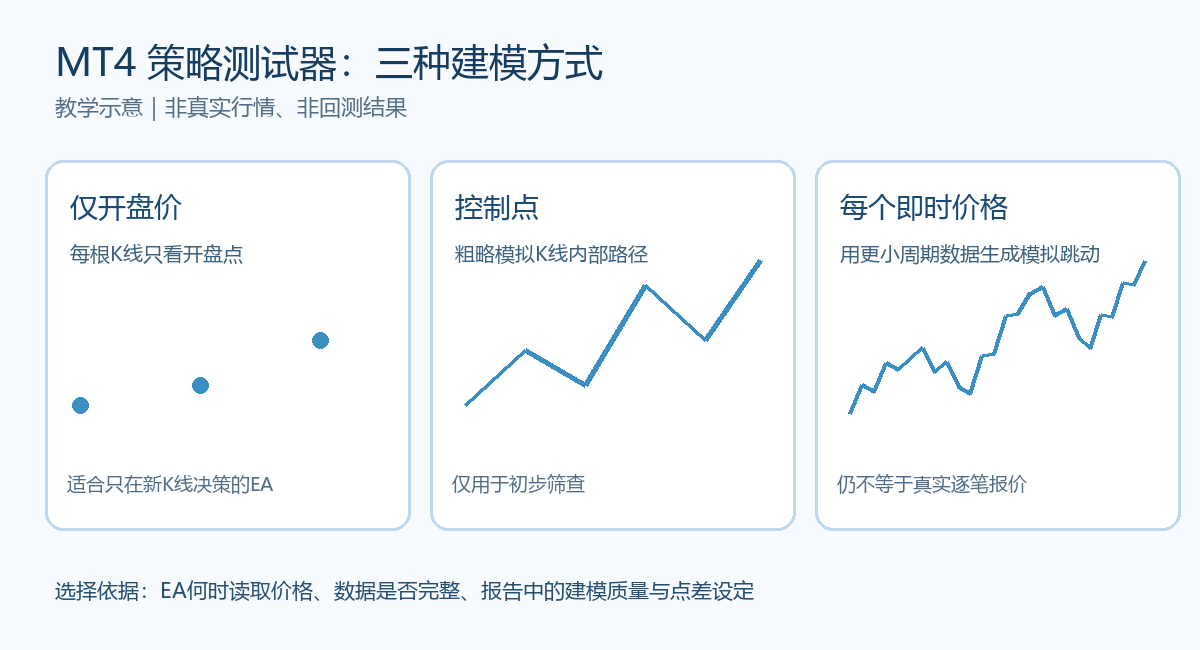
"Open Prices Only" calls the strategy only at the start of each test candlestick, suitable for EAs that explicitly read signals only on a new candlestick and do not depend on the order of triggers within the candlestick. "Control Points" uses a rough internal path for quick estimation, suitable for initial screening, and cannot be used to confirm fine entry or stop-loss effects. "Every Tick" uses available smaller-timeframe historical data to generate price movements, with higher granularity, but the generated path may still differ from the real tick-by-tick quotes at the time. The three options are not a simple ranking where "speed, accuracy, and realism" can be equated.
How to choose: first check when the EA makes decisions
Step one: read the EA description or code: does it make only one judgment when a new candlestick appears, or does it check entries, move stop-losses, trail take-profits, and add positions on every quote update? If the strategy only issues signals when a new candlestick forms, you can first use "Open Prices Only" to quickly iterate parameters, then use a finer mode to check whether there are differences in order management. If the EA depends on which line the price within the candlestick touches first and when a trailing stop is triggered, you should use "Every Tick" as the main backtest and observe whether results are stable under different data conditions.
Step two: fix the symbol, timeframe, backtest period, initial capital, and spread, and record each change. MT4 official help states that the tester spread can use the current spread at the time the test is started, or a specified value. Therefore, "current spread" is not the real varying spread over the entire historical period. Short-term EAs are sensitive to spread; at minimum, check results using multiple justified spread assumptions, and do not use the lowest-cost set to represent the future.
Step three: check whether historical data covers the entire period. Official documentation states that "Every Tick" mode relies on smaller-timeframe data and usually requires complete M1 history. Gaps, data from different sources, or differences in broker quotes will change modeling and order results. Before moving the same set of parameters to another platform, first verify contract specifications, trading hours, and spreads, rather than directly copying backtest conclusions.
What to look at in the report, and what cannot be treated as proof
After the test is complete, check the report's modeling quality and the colored sections of the chart to see whether there is missing or inconsistent historical data. The modeling quality of "Open Prices Only" mode may show n/a; this does not mean the strategy passed strict validation. Then check the number of trades, maximum drawdown, consecutive losses, and the trigger times of key orders. High returns supported by a small number of trades are especially likely to be driven by individual samples; significant deterioration after a slight parameter change should also be regarded as a signal of insufficient robustness.
A common mistake is to see that "Every Tick" and "Open Prices Only" returns are close and conclude that the EA is reliable. Similarity only means the results are close under these two simulation conditions. Historical matching cannot fully reproduce network latency, slippage, order rejections, extreme spreads, and future market changes. A more prudent next step is to reserve a sample period not used for parameter tuning, check different spreads and market phases, and then observe real-time behavior in a demo account. If the strategy clearly fails in the finer mode, first identify the trigger differences and data issues, rather than continuing to tune parameters until the curve looks good.

MT4 EA troubleshooting guides →