MT4 gold EA has no logs on weekends—is it stuck? First distinguish quotes from timer events
OnTick depends on new quotes for the chart symbol, while OnTimer requires the program to subscribe. Troubleshoot by event entry point, log location, and reinitialization records, and avoid directly judging a fault from no output during market closure.
Author: Thomas | MT4 Practice | November 14, 2026
Summary: When opening the terminal on weekends, the EA interface is still there but there are no new logs for a long time. This phenomenon alone cannot be used to determine that the program is frozen. Troubleshooting should first clarify what event triggers the program and whether it will actually print logs at that entry point, then check the terminal status. This article does not test the program by placing live orders, nor does it treat flowcharts as proof that any EA has passed testing.
Without new quotes, quote events may not occur
MetaQuotes official MQL4 documentation states that only when the chart symbol attached to the EA receives a new quote is the corresponding NewTick event generated and the correctly declared OnTick handler called. If the program puts both checks and logging inside this entry point, then during periods without new quotes there may be no new execution records.
This does not mean all EAs must wait for quotes. Programs can also use entry points such as timers or chart events. Therefore, seeing "weekend" cannot be used to explain all silence in general, and the phenomenon that another symbol is still updating cannot be treated as evidence that the current gold chart must be receiving quotes.
First identify which event the program is waiting for
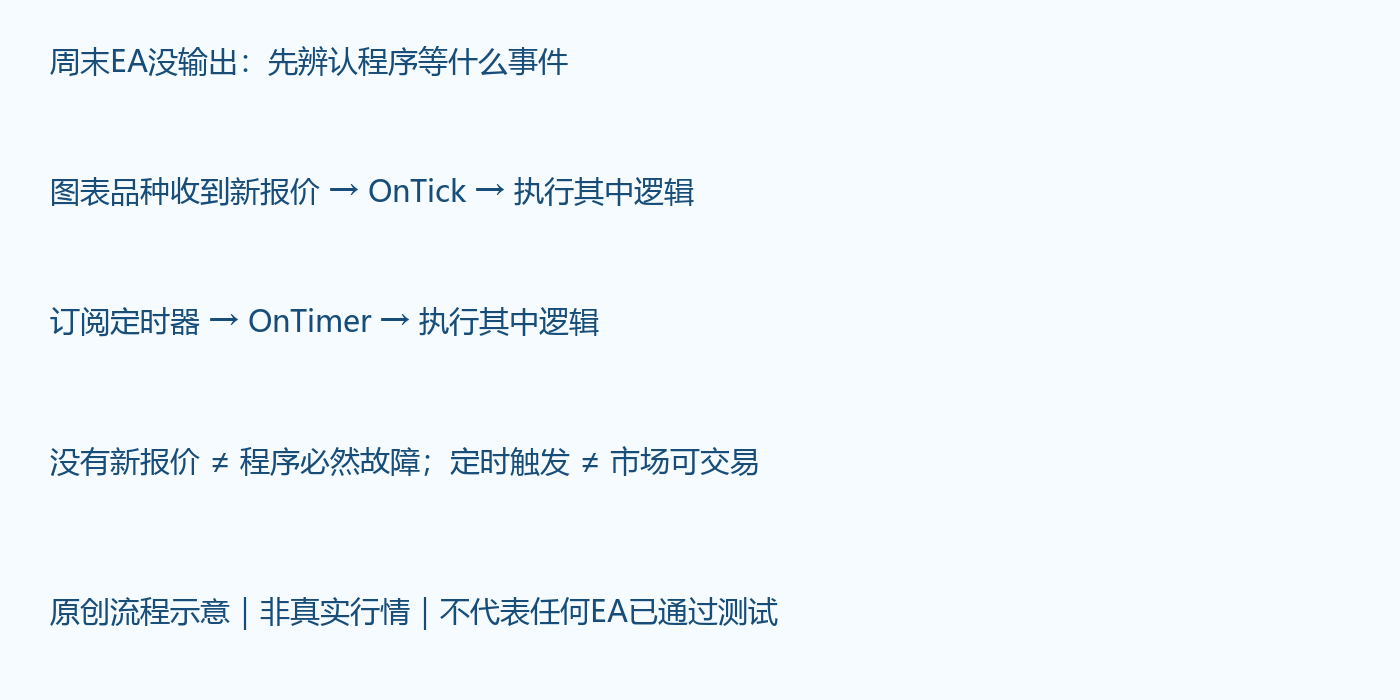
The image is an original instructional flowchart illustration, not real market data, and does not show an actual trading account. The first path depends on new quotes for the chart symbol; the second depends on the program successfully subscribing to a timer. Timer events can trigger check logic, but that does not mean the current market can execute trades; the program must still verify trading conditions and data validity.
Official guidance recommends subscribing to the timer during initialization and canceling it during uninstallation. Merely writing an OnTimer function without subscribing does not mean it will run periodically. The function name, parameters, and return type must also meet event handling requirements; any spelling error may prevent the expected entry point from being called.
How ordinary users can troubleshoot step by step
First verify the account, server, chart symbol name, and current connection status, and confirm that you are viewing the correct terminal. Record the last quote time and the platform trading time; do not use the computer clock in place of server market time. Regular weekend market closure also does not mean the trading schedules of other products are exactly the same; the specific platform announcements should prevail.
Then check relevant logs such as Experts and Journal, and save the last few initialization, uninstallation, or error records. Pay attention to log filters, dates, and whether another terminal was being viewed. If the EA itself only prints when trading conditions occur, no new records may simply mean the printing conditions have not been met, and this cannot prove that the program has never run.
Next, check whether the EA documentation includes scheduled checks, heartbeat output, or weekend maintenance mechanisms. When there is no source code, provide the version, parameters, chart symbol, last quote time, and logs to the provider for verification; do not assume that all products use the same event structure.
What to verify first when source code is available
In a simulated environment, verify the declarations of entry points such as OnInit, OnTick, and OnTimer and the necessary subscriptions, and use diagnostic logs at a moderate frequency to confirm the actual path. Logs can record event type, symbol, and data time, avoiding writing only "normal" without reviewable context. Do not write account passwords or other credentials into diagnostic output.
Terminal operation, chart loading, event triggering, and trade execution are different layers. Timer output still cannot prove that quotes are fresh, nor can it prove that orders can definitely be sent. When quote events are not triggered, it is even more inappropriate to verify whether the program is alive by loosening trading permissions or repeatedly submitting orders.
Why repeatedly switching timeframes may interfere with troubleshooting
Official documentation states that changes to the chart symbol or timeframe and changes to input parameters involve uninstallation and reinitialization. Repeated switching may cause the original problem to be masked by a new initialization process, and may also trigger the program to reload state. You should first save logs and parameters, then verify in a safe environment according to the documentation, rather than repeatedly reattaching the EA to see whether it occasionally recovers.
Different EAs implement position recovery, variable persistence, and duplicate-order protection differently. This article does not guarantee that reloading is safe, and does not recommend blindly uninstalling or restarting when real exposure exists. Any maintenance operation should first clarify who manages the positions.
How to determine that troubleshooting is complete
If it has been confirmed that the current symbol has no new quotes, the logic is located only at the quote entry point, and there is no other evidence of error, it can be recorded as waiting for market data rather than claiming that the program has been fixed. If the timer entry point should have been running but continues to produce no output, continue checking subscriptions, initialization results, and program errors; market closure cannot be used to explain everything.
After quotes resume, first verify timestamps and status, then confirm that the program handles new events as expected. Event recovery does not prove that the trading strategy has a profit advantage; orders still face spread, slippage, and execution risk. The goal of troubleshooting is to find out at which layer the program actually stopped, not to obtain answers by taking risks in live trading.

MT4 EA troubleshooting guides →