Why do two gold EAs manage the same order? Check the MT4 magic number
Use a demo account case to explain how an EA filters orders by symbol and magic number, and how to avoid leftover positions losing management after changing the number.
Author: Thomas | MT4 Practice | November 10, 2026
Summary: When two gold EAs are attached to the same MT4 account, if they use the same order identification conditions, they may both modify the stop loss of one order. When troubleshooting, first look at the symbol and magic number on the order, then look at which conditions the code actually filters by. The numbers and orders below are teaching assumptions.
Where the magic number is recorded
MQL4's OrderSend supports passing a magic parameter. After an order is successfully selected, OrderMagicNumber can read that order's identification number. It can provide a basis for classification to the program. Which specific orders will be modified or closed is still determined by the EA's own filtering and execution logic. If the program only checks the symbol when iterating over account orders, two gold EAs may process the same batch of orders even if they are filled with different magic numbers.
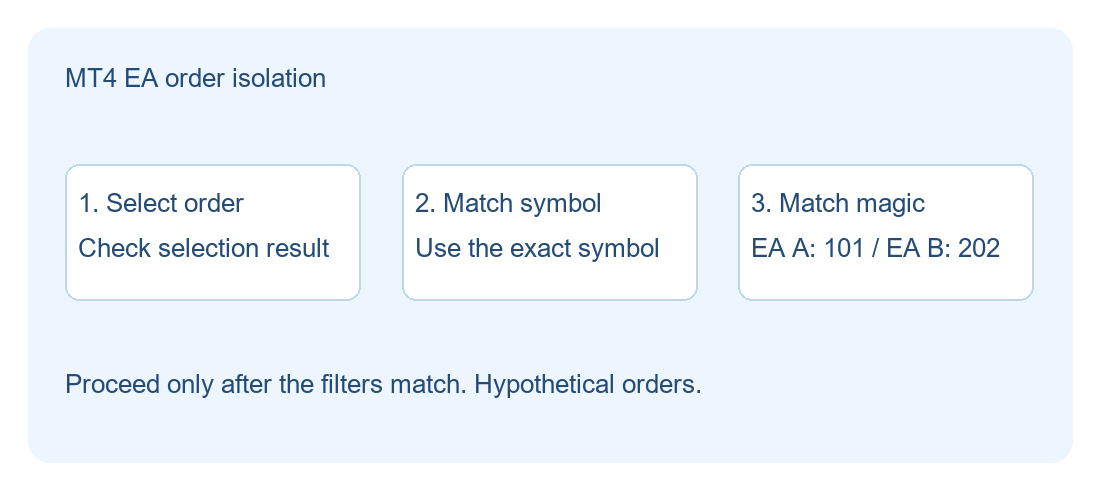
In the figure, assume strategies A and B use 101 and 202 respectively. A selects orders from the trading pool one by one, first checking the actual symbol, then checking the identification number. Only when both match is it handed to subsequent logic to check the order type and permitted actions. If order selection fails, it should skip and log the error. Before making modifications, it is advisable to select the target order again to avoid using old data previously copied into the program.
Verify in three steps with a demo account
Step one, record the versions, input parameters, chart periods, and broker's full symbol names of the two EAs. Gold names on different accounts may have suffixes. When deploying multiple instances on the same symbol, also clarify whether they are managed independently or designed to share orders.
Step two, in a demo account, have each EA generate one identifiable test order, and also prepare one test order that should be excluded. The log should at least record the order number, symbol, magic number, and the action the program is about to execute. Then trigger one controllable management action, for example trying to modify strategy A's own test order, and check whether strategy B's order remains at its original value. It is best to verify pending orders and filled positions separately, because the trading pool can contain both types of orders, and the actual processing rules are usually different.
Step three, check again after restarting the terminal or reloading the EA. If the program only remembers the order list established during the current run, behavior may change after restart. You can check whether it re-identifies orders according to the established conditions, and whether unexpected actions occur when no orders match. The number is only an auxiliary isolation; if the account-wide total risk check intentionally reads all positions, it should be recorded separately from the permission to actually modify orders.
Handle old orders before changing the number
Assume strategy A previously used 101 to establish a position and now changes to 303. Input parameter changes usually only affect the values used by subsequent code; the identification numbers of old orders do not automatically migrate with the chart settings. If the management condition only matches 303, the original 101 orders may be skipped. Before the change, list the old orders and the intended handling method, then verify restart and handover in a demo environment. For EAs whose version cannot be checked or whose logs cannot explain the filtering logic, pause automatic management changes first and check the exit arrangements for existing positions. Passing in demo can only show the tested scenarios; real quote changes, server order rejection, and slippage still need separate evaluation.

MT4 EA troubleshooting guides →