MT4 AutoTrading Is On—Why Is the EA Still Not Placing Orders? Check Four Gates
AutoTrading being lit only means the terminal's global switch allows automated trading. You also need to check the EA's own permissions, account and server restrictions, quotes and strategy conditions, and find evidence in Experts and logs.
Author: Thomas | MT4 Practice | October 27, 2026
The AutoTrading button on the MT4 toolbar is already on, and the EA is attached to the chart, yet no orders appear. The most common mistake is repeatedly reinstalling the EA, or loosening risk parameters just to make it "move." The button only resolves one permission gate; an EA not placing orders may also be because entry conditions never occurred, the symbol does not match, the account is restricted, or the order was rejected by the server. First locate which layer it is stuck at, then decide whether settings need changing. This article is an operational tutorial and contains no real account or test results.
Diagram: Four Gates, Not One Button
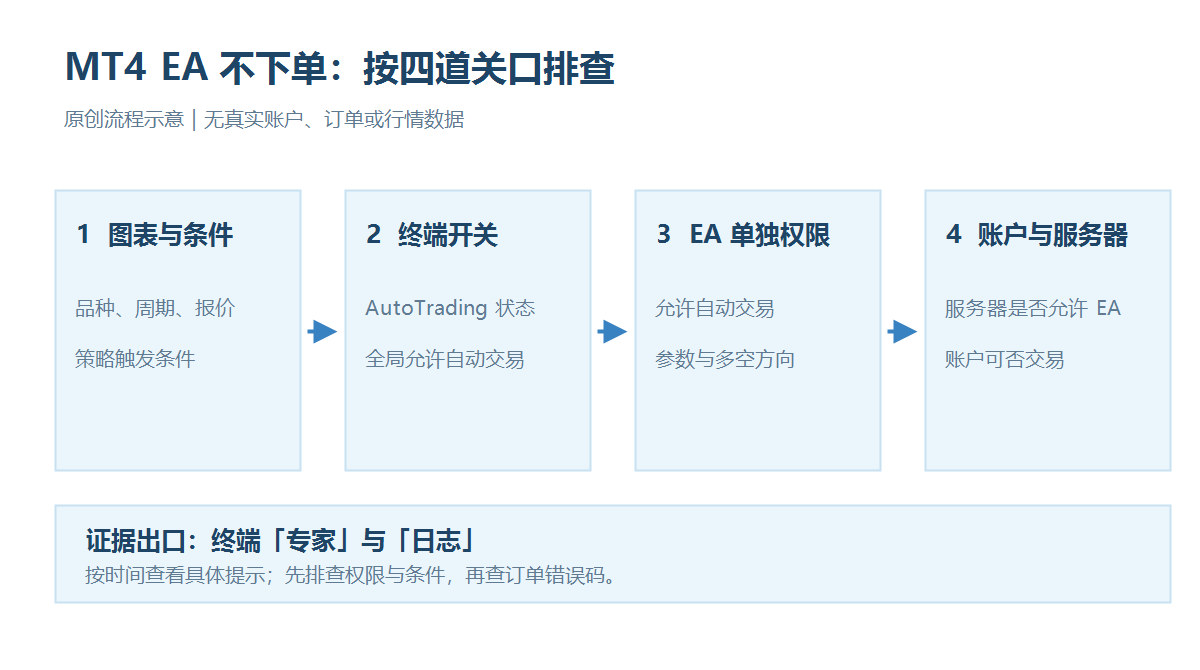
The first gate is the chart and strategy conditions, the second is the terminal's global automated trading switch, the third is this EA's own trading permission, and the fourth is the operations allowed by the account and server. If any layer fails, it may appear as "the EA is running, but there are no orders." MetaQuotes' MT4 help states: if the terminal's automated trading is disabled, even if the EA itself allows automated trading, it cannot execute trades; and terminal permission does not guarantee that an individual EA will trade. The arrows in the diagram indicate the troubleshooting order, not that turning on all switches should necessarily produce orders.
Step 1: Confirm Whether the EA Is Actually Receiving a Valid Environment
Check whether the chart symbol, timeframe, and strategy description the EA is attached to are consistent, and whether quotes continue updating during the trading session. Some brokers add suffixes to symbols, for example different naming for XAUUSD; if the EA code only recognizes one fixed name, it may not satisfy its own check conditions. Then verify the input parameters for trading session, direction filter, maximum spread, and existing position limits. When the strategy has not triggered a signal, having no orders is a normal result; do not equate quiet with malfunction. Do not force the EA to place orders by artificially narrowing thresholds.
Step 2: Check Global and Individual EA Permissions Separately
Check the global AutoTrading status in the terminal settings and toolbar, then open the EA properties on that chart and check the corresponding option such as "Allow live automated trading." MT4 official documentation notes that when switching accounts, switching profiles, or changing chart symbol or timeframe, automated trading can be set to disable automatically as protection; if you have just performed these operations, recheck the status. For EAs of unknown origin, do not casually enable DLL imports or arbitrary URL access just for troubleshooting. Those are separate security permissions and are not the same thing as whether order placement is allowed.
Step 3: Let the Logs Tell You Where It Stopped
Open the terminal's "Experts" and "Journal" tabs and review messages by order attempt time. MetaQuotes states that the "Experts" tab records EA runtime prompts, opening and closing positions, and order modifications. If there are no order attempts at all, first return to strategy trigger conditions and EA loading status; if it says trading is not allowed, continue checking terminal, individual EA, and account permissions. Among official MQL4 error codes, 4109 corresponds to trading not allowed, and 4112 corresponds to EA trading disabled by the server. Error codes only provide clues; still judge based on the complete log at that time, and do not change settings based on a single number alone.
Step 4: Distinguish Permission Problems from Order Problems
If the log already shows an order submission record but it was rejected, then it is not that "the EA never triggered." At this point check the contract minimum lot size, stop distance, available margin, market open/closed status, and the specific error returned by the server; do not attribute every rejection to AutoTrading. If the account side restricts automated trading, contact the broker to confirm the rules; do not try to bypass restrictions by changing charts. First reproduce in a demo environment and save the time, symbol, parameters, and logs, then handle it by referring to official documentation or the EA developer's instructions. One successful order only means the conditions were met that time; it does not mean the logic, risk control, or live performance is reliable.

MT4 EA troubleshooting guides →